Sonoff NSPanel Pro Review | DIY Smart Home
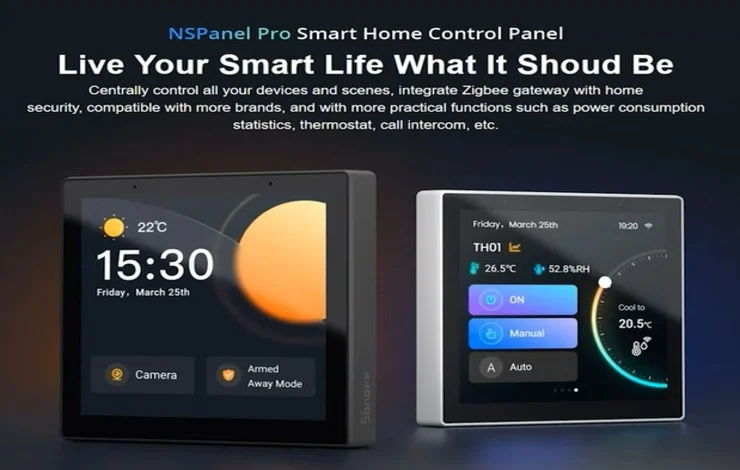
If you’ve ever dreamed of transforming your home into a true smart home control hub, the Sonoff NSPanel Pro might just be the centerpiece you’ve been waiting for. Designed by Sonoff, a brand well-known in the DIY smart home space, this elegant touchscreen smart panel is packed with powerful features — including Zigbee, Wi-Fi, Bluetooth, and now Matter support.
In this detailed Sonoff NSPanel Pro review, we’ll explore its hardware, software experience, integration with third-party devices, and whether it’s really worth installing as part of your home automation system in 2025.
🧠 Overview: What is the Sonoff NSPanel Pro?
The Sonoff NSPanel Pro is a smart touchscreen control panel that serves as a central hub for your connected devices. Running on a modified Android system, it allows you to manage your lights, sensors, cameras, and other IoT devices directly from a 4-inch touchscreen display.
Unlike the earlier NSPanel, which featured two physical buttons and limited control, the Pro version upgrades everything from processing power to connectivity. However, it drops the built-in relay control, which may be a limitation for those who relied on it in the first-generation version.
⚙️ Hardware: The Power Beneath the Touchscreen
While the 4-inch color display is the main attraction, the hardware under the hood is what truly sets this device apart.
Key specifications include:
- Display: 480×480 resolution
- RAM: 2GB
- Storage: 8GB internal
- Connectivity: Wi-Fi, Bluetooth, and Zigbee 3.0 Hub
- New Feature: Matter support (added via software updates)
The NSPanel Pro’s brightness is excellent clear enough even in bright rooms and it can be mounted on the wall or placed on a docking stand for use on a desk or nightstand.
Although its 8GB storage might sound small, it’s more than sufficient for basic operation. Advanced users can even experiment with custom software tweaks if they’re into DIY modifications.
📲 Initial Setup: Using the eWeLink App
Setting up the Sonoff NSPanel Pro is simple and beginner-friendly.
To begin, download the eWeLink app Sonoff’s official home automation platform. Once installed, scan the QR code displayed on your panel to link it to your account.
Within seconds, your panel syncs with the app and displays a beautiful home screen showing:
- Time & Date
- Weather Information
- Dynamic Backgrounds
If you’ve connected any cameras, you’ll also see a camera shortcut for quick access.
🖥️ User Interface & Experience
The interface is clean, modern, and intuitive. The main screen lets you control lighting scenes, security modes, and smart sensors with just a few taps.
You can drag down from the top of the screen to access:
- New device pairing
- Camera integration (RTSP or DIY camera streams)
- Theme customization
- System settings (Wi-Fi, Bluetooth, etc.)
While customization is limited to wallpapers and themes, the overall UX feels polished and smooth. The winter-themed background looks particularly elegant — and you can even upload your own wallpapers via the eWeLink app.
💡 Pairing New Devices
This is where the Sonoff NSPanel Pro really shines.
You can pair Zigbee and Wi-Fi devices directly, as well as integrate Matter-enabled devices. In our test setup, the panel easily detected:
- Human presence sensors
- Smart buttons
- Smart switches (neutral & non-neutral types)
Once paired, all devices appear neatly on the Devices screen. Each tile displays real-time data such as:
- Motion activity
- Switch states
- Temperature and humidity (if supported)
The device records detection history too, giving you insights into sensor activity handy for security or automation purposes.
🌈 Third-Party Light Integration
Sonoff’s eWeLink ecosystem integrates well with third-party smart lights.
For instance, you can link your Philips Hue or Tuya-based RGB lights and control them directly from the NSPanel Pro interface.
Using the color picker, you can drag your finger to adjust brightness and color temperature — from warm whites to vibrant RGB tones.
However, there’s a noticeable delay between your touch input and the light’s response. While this might improve in future updates, the latency can be a bit annoying for users who expect instant results.
🌡️ Thermostat and Heating Controls
Another area where the NSPanel Pro shows potential is in climate control.
The device recognizes thermostats and radiator valves, but at the time of review, the new radiator valve cannot yet be used as an action device.
This means you’ll need to manually control heating, unless you integrate it with a more flexible automation platform like Home Assistant.
Still, the user interface for thermostat controls looks neat and responsive suggesting that Sonoff may unlock more automation capabilities in future firmware updates.
🎥 Camera Integration & Live View
If you own IP cameras that support RTSP or DIY streaming, you can add them directly to the panel.
The Camera View is crisp, and the NSPanel Pro even supports two-way audio communication effectively turning it into a mini intercom system.
This is particularly useful for front door monitoring or baby room setups. You can also make voice calls between:
- Panel ↔ eWeLink App
- Panel ↔ Another NSPanel Pro
It’s an underrated but extremely useful feature, especially if you install multiple panels around the home.
🌐 Webpage Function & Entertainment
While the NSPanel Pro is not designed as a media device, you can still use its web browser feature to:
- Watch YouTube videos
- Check online dashboards
- Access local web interfaces for DIY devices
The built-in speaker delivers decent sound for voice feedback or notifications. It’s not stereo quality, but adequate for daily smart home use.
💸 Pricing and Availability
At the time of this review, Sonoff was running a Black Friday sale, pricing the NSPanel Pro at around $78 USD.
Considering its Zigbee hub, Matter support, and Android base, this is an impressive value for money.
You can purchase it directly from the official Sonoff store or authorized retailers on Amazon and AliExpress.
Additionally, most Sonoff devices, including smart switches and sensors, are discounted during seasonal sales making it a great time to build or expand your smart ecosystem.
🧩 Home Assistant Integration
For advanced DIY enthusiasts, Home Assistant integration is the real game changer.
Many tech users prefer bypassing the eWeLink cloud and connecting the NSPanel Pro directly to Home Assistant for:
- Local automation (no internet required)
- Faster device response
- Custom dashboards and scripts
Sonoff seems aware of this growing trend, they’ve even begun advertising Home Assistant compatibility for several of their newer devices.
This makes the NSPanel Pro not only a sleek controller but also a solid foundation for custom smart home setups.
🧭 Final Thoughts: Should You Buy the Sonoff NSPanel Pro?
The Sonoff NSPanel Pro represents a bold step forward in smart home control technology.
Here’s the bottom line:
✅ Pros
- Gorgeous 4-inch touchscreen display
- Built-in Zigbee 3.0 hub
- Matter-compatible via updates
- Supports camera view and two-way intercom
- Works with Home Assistant
- Affordable for its feature set
❌ Cons
- Occasional UI lag and device delay
- Missing built-in relay switch from older version
- Limited customization options
- Some features (like thermostat actions) still incomplete
In conclusion, the NSPanel Pro is an excellent device for DIY enthusiasts and smart home tinkerers who love experimenting and personalizing their setups.
However, if you prefer a plug-and-play experience, it might feel a bit technical, at least until Sonoff’s software catches up with its stellar hardware.
Either way, it’s a powerful, affordable, and future-ready addition to any modern smart home.
❓ FAQ: Sonoff NSPanel Pro Review
1. What is the Sonoff NSPanel Pro used for?
It’s a smart touchscreen control panel used to manage and monitor smart devices, including lights, sensors, thermostats, and cameras, all from one central hub.
2. Does the NSPanel Pro have a built-in relay switch?
No, the Pro version removed the physical relay control found in the original NSPanel, likely due to hardware and design constraints.
3. Can I use the NSPanel Pro without the internet?
Yes. When paired with Home Assistant or configured for local control, many features work without relying on the cloud.
4. Does it support Matter and Zigbee?
Absolutely! It includes a Zigbee 3.0 hub and now supports Matter devices after the latest firmware update.
5. Is the NSPanel Pro compatible with Alexa or Google Home?
Yes. Through the eWeLink app, it supports Alexa, Google Home, and SmartThings for voice and app control.
6. Can I mount it on a desk instead of a wall?
Yes. Sonoff offers a docking frame accessory that allows you to place it on your desk or nightstand conveniently.
7. Is the Sonoff NSPanel Pro worth buying in 2025?
If you enjoy DIY automation, want Matter support, and need a sleek smart home controller, it’s definitely worth considering, especially during sale periods.
In summary:
The Sonoff NSPanel Pro is a blend of innovation and flexibility that shows where home automation is headed touchscreens replacing traditional switches. Though not perfect yet, it’s a DIY dream device and an exciting glimpse into the future of smart home control.