Smart Home Automation 2026: Setup, Devices & Tips
The Complete Guide to Smart Home Automation 2026: Transform Your Living Space
Everything you need to know about smart home automation in 2026 — from choosing your first device to building a fully automated home. Beginner-friendly, budget options included, room-by-room guide with real automation examples.
Smart home automation in 2026 means using Wi-Fi connected devices — lights, thermostats, locks, cameras, speakers — that work together automatically through schedules, sensors, and voice commands. Start with a smart speaker ($99) + smart thermostat ($130) + smart bulbs ($15 each) for under $300. Use Matter protocol devices for maximum compatibility across Alexa, Google, and Apple HomeKit.
- What Is Smart Home Automation in 2026?
- Why Invest — Real Benefits and ROI
- Smart Home Ecosystems — Alexa vs Google vs Apple
- Protocols Explained — Matter, Zigbee, Z-Wave, WiFi
- How to Get Started — Step by Step
- Best Smart Home Devices 2026 — Tier by Tier
- Room-by-Room Automation Guide
- Creating Powerful Automations and Scenes
- Voice Control Mastery
- Smart Home Security and Privacy
- Matter Protocol — The 2026 Game Changer
- Full Cost Breakdown and ROI Analysis
- Troubleshooting Common Issues
- FAQs
What Is Smart Home Automation in 2026?
Smart home automation is the use of internet-connected devices that can be controlled, monitored, and automated through your smartphone, voice commands, or intelligent programming. In 2026, the technology has matured dramatically — devices from different brands now work together through the Matter protocol, setup takes minutes instead of hours, and AI assistants make automation smarter than ever.
At its core, smart home automation has three layers. First is control — the ability to operate any device from your phone or by voice from anywhere in the world. Second is monitoring — real-time awareness of your home’s status, from security cameras to energy usage. Third is automation — devices working together intelligently without any manual input, triggered by time, location, sensors, or conditions.
Why Invest in Smart Home Automation — Real Benefits and ROI
1. Energy Savings — Biggest Financial Return
Smart home automation typically reduces energy consumption by 10–30%, delivering $200–$600 in annual savings for the average household. Smart thermostats alone save 15–20% on heating and cooling. Smart plugs eliminate phantom standby power. Automated lighting ensures lights never run in empty rooms. The combination pays back the initial investment within 12–24 months.
2. Security — Peace of Mind From Anywhere
Smart security systems in 2026 offer real-time alerts, remote camera access, smart locks with temporary access codes, and integration between devices — when your doorbell camera detects someone, lights automatically turn on inside and outside. Simulated presence automation makes your home appear occupied while you travel.
3. Convenience — Your Home Works for You
Voice control, automated routines, and remote access eliminate the small daily friction points that add up. Your morning coffee starts when your alarm dismisses. All lights turn off when you leave. Your front door unlocks as you pull into the driveway. These automations save 15–30 minutes per day of manual tasks.
4. Property Value
A 2024 survey found 65% of homebuyers are willing to pay more for homes with smart technology. Smart security systems, thermostats, and lighting are the most valued features. A well-implemented smart home system can add 3–5% to property value — significantly more than the cost of installation.
Smart Home Ecosystems 2026 — Alexa vs Google vs Apple
Before buying any smart home device, choose your ecosystem. This decision determines which voice assistant you use, which hub manages your devices, and which app controls everything. In 2026, Matter protocol means most devices work across all three platforms — but picking a primary ecosystem still matters for the best experience.
- 100,000+ compatible devices
- Alexa Plus AI in 2026
- Echo hub has built-in Zigbee
- Most affordable entry point
- Best third-party skills
- Best natural language AI
- Deep Google services integration
- Nest product ecosystem
- Strong routine capabilities
- Best for Android households
- Industry-best privacy
- Local processing — no cloud
- Siri voice control
- HomePod mini as hub
- Best security standards
- Supports Zigbee + Z-Wave + Matter
- Works with all 3 platforms
- 5,000+ devices supported
- Best central hub for mixed homes
- Powerful automation engine
Protocols Explained — Matter, Zigbee, Z-Wave, Wi-Fi
Smart home devices communicate through different wireless protocols — and understanding these helps you buy compatible devices and avoid frustrating setup problems.
| Protocol | Hub Needed | Range | Power Use | Best For |
|---|---|---|---|---|
| Matter | ✅ Thread router | Excellent | Low | All devices — 2026 standard |
| Wi-Fi | ❌ None | Home-wide | High | Cameras, speakers, displays |
| Zigbee | ✅ Hub | Mesh network | Very Low | Bulbs, sensors, switches |
| Z-Wave | ✅ Hub | Mesh network | Very Low | Locks, security devices |
| Bluetooth | ❌ None | 30–100ft | Low | Locks, local control |
| Thread | ✅ Border router | Mesh network | Ultra Low | Future-proof IoT devices |
Always buy Matter-certified devices when possible — they work with Alexa, Google, and Apple HomeKit simultaneously, future-proofing your investment. Look for the Matter logo on packaging. If buying Zigbee devices, Amazon Echo (4th Gen) has a built-in Zigbee hub — no separate purchase needed.
How to Get Started with Smart Home Automation 2026
The biggest mistake beginners make is buying too many devices at once without a plan. Follow this structured approach for the best experience and fastest return on investment.
Choose Your Ecosystem
Decide between Alexa, Google Home, or Apple HomeKit based on your existing devices and phone. This determines your hub and voice assistant. If mixed household, Samsung SmartThings works with all three. This decision affects every future purchase — make it deliberately.
Start with High-ROI Devices
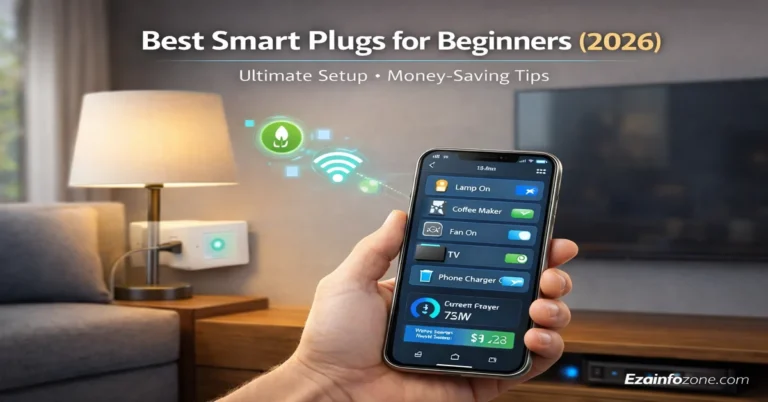
Begin with a smart thermostat — it delivers the largest single energy saving and pays for itself fastest. Then add smart plugs to eliminate phantom power from your TV and gaming console. Then smart bulbs in the most-used rooms. These three categories together cost under $200 and save $150–$300 per year.
Set Up Your Hub and App
Install your ecosystem’s app (Alexa, Google Home, or Home) and add your first devices. Most devices set up in under 5 minutes by scanning a QR code. Assign each device to its room in the app — this enables room-level voice control (“turn off the kitchen lights”).
Create Your First Automations
Start with two automations: a “leaving home” routine that turns off all lights and adjusts the thermostat, and a “good morning” routine that starts your coffee and gradually brightens bedroom lights. These two automations alone demonstrate the power of smart home technology immediately.
Expand Room by Room
After your foundation is working smoothly, expand one room at a time. Security devices next (doorbell camera, smart lock), then entertainment, then remaining rooms. Expanding gradually lets you learn what works for your lifestyle before committing to larger investments.
Best Smart Home Devices 2026 — Tier by Tier
These are the highest-ROI smart home devices. Buy these first regardless of budget — they pay for themselves fastest.
Room-by-Room Smart Home Automation Guide 2026
The social hub of your home — start here for the most visible impact.
- Smart speaker (hub)
- Smart TV or streaming stick
- Smart bulbs + light strips
- Smart power strip
- Smart blinds
- Movie Night: dim to 10%, close blinds
- Party Mode: colored lights + music
- Away: all off + security armed
- Sunset: lights auto-on at dusk
Safety, efficiency, and morning routines — highest automation impact per room.
- Smart display (Echo Show)
- Smart coffee maker plug
- Water leak sensors
- Smart smoke detector
- Under-cabinet lighting
- Morning: coffee starts on alarm dismiss
- Leak: water shutoff auto-trigger
- Energy: dishwasher off-peak scheduling
- Safety: stove shutoff if no motion
Sleep quality and morning routines — second highest daily impact room.
- Smart thermostat
- Smart bulbs (dimmable)
- Smart blinds
- Smart speaker
- Motion night light
- Wake Up: gradual light + coffee start
- Sleep: dim + cool + close blinds
- Night light: dim motion-activated
- Away: simulated presence lighting
Productivity, video calls, and end-of-day shutdown automation.
- Adjustable color temp bulbs
- Smart desk lamp
- Smart plug for equipment
- Smart blinds (glare control)
- Air quality sensor
- Work Mode: cool white light + DND
- Video Call: optimize camera lighting
- End of Day: equipment off reminder
- Focus: Pomodoro timer + music
Security, convenience, and landscaping automation.
- Video doorbell
- Smart garage door opener
- Outdoor security cameras
- Smart irrigation (Rachio)
- Motion-activated lights
- Arrive home: pathway lights on
- Garage: auto-close after 5 mins
- Irrigation: skip if rain forecast
- Security: motion lights + camera
Creating Powerful Automations and Scenes
The real magic of smart home automation happens when devices work together automatically. Here are the most impactful automations to set up first:
Trigger: Alarm dismissed on phone (6:30 AM weekdays)
- Bedroom lights brighten gradually over 10 minutes
- Color temperature shifts from warm to energizing cool white
- Thermostat increases from sleep temperature to active temperature
- Coffee maker starts brewing
- Bathroom lights and heated towel rack activate
- Weather and calendar briefing plays through bedroom speaker
Trigger: Last person leaves (geofencing)
- All lights turn off
- All smart plugs switch to standby mode
- Thermostat switches to away/eco mode
- All doors lock automatically
- Security cameras activate
- Garage door closes if open
- Confirmation notification sent to phone
Trigger: “Good night” voice command or 11 PM schedule
- Verify all doors locked — alert if any open
- All lights off except bedroom night mode
- Thermostat drops to sleep temperature (66–68°F)
- Blinds close for privacy and blackout
- Security system arms in home mode
- White noise or sleep sounds activate
Voice Control Mastery 2026
Voice control is the most natural way to interact with your smart home. In 2026, AI assistants have become significantly smarter — Alexa Plus understands context, Google Assistant handles complex multi-step requests, and Siri integrates deeply with iPhone shortcuts.
- “Turn off everything” — shuts off all lights and switches in your home
- “Good morning” — triggers your full morning routine
- “Movie time” — dims lights, closes blinds, turns on TV
- “Is the front door locked?” — status check without moving
- “Set bedroom to 68 degrees” — individual room temperature
- “Turn on the lights in the kitchen to 50%” — precise control
- “Add milk to my shopping list” — smart home productivity
Smart Home Security and Privacy 2026
Network Security Fundamentals
Your smart home is only as secure as your Wi-Fi network. Use WPA3 encryption if your router supports it, create a separate IoT network for smart home devices isolated from your main computers and phones, use strong unique passwords for every device and app, and enable two-factor authentication on all ecosystem accounts.
Device-Specific Security
Keep all device firmware updated — manufacturers regularly release security patches that protect against known vulnerabilities. Change default passwords on every device before putting them on your network. Disable features you don’t use — if a camera doesn’t need remote access, disable it. Audit your connected devices quarterly and remove any you no longer use.
Privacy Best Practices
Voice assistants are always listening for wake words — understand what data is being collected and stored. Review and delete voice history regularly in Alexa, Google, and Apple apps. Consider using local-processing options like Home Assistant or Apple HomeKit for sensitive areas of your home. Never put cameras in bedrooms or bathrooms.
Matter Protocol — The 2026 Game Changer
Matter is the most important development in smart home technology in years. Launched in 2022 and now fully mature in 2026, Matter is a universal standard supported by Amazon, Apple, Google, Samsung, and hundreds of device manufacturers. A Matter-certified device works with all three major platforms simultaneously — no ecosystem lock-in.
- Devices work across all platforms
- No hub required for basic control
- Local processing — works without internet
- Future-proof purchases
- Simpler setup — scan QR code, done
- Not all devices support it yet
- Thread border router needed for full benefits
- Some advanced features still platform-specific
- Older devices won’t get Matter updates
Always look for the Matter certification badge when buying new smart home devices. It guarantees compatibility with your current platform AND any platform you switch to in the future. This single decision future-proofs every purchase you make.
Full Cost Breakdown and ROI Analysis 2026
| Setup Level | Total Cost | Annual Savings | Payback Period |
|---|---|---|---|
| Starter (Thermostat + Plugs + Bulbs) | $200–$350 | $150–$250/yr | 12–18 months |
| Security Add-on (Doorbell + Lock + Camera) | $400–$700 | Insurance discount | 2–3 years |
| Full Living Room | $500–$900 | $200–$400/yr | 18–24 months |
| Whole Home (All Rooms) | $2000–$5000 | $400–$800/yr | 3–5 years |
| Premium (Solar + Full Automation) | $10,000+ | $1000–$2000/yr | 5–10 years |
Troubleshooting Common Smart Home Issues
- Device won’t connect to Wi-Fi: Make sure phone is on 2.4GHz network during setup, not 5GHz. Most smart devices only support 2.4GHz.
- Alexa/Google can’t find device: Say “discover devices” or re-link the device skill/integration in the app.
- Automation not triggering: Check geofencing location permissions are set to “Always” on your phone — “While Using” breaks location-based automations.
- Device goes offline frequently: Wi-Fi signal too weak at device location. Add a Wi-Fi extender or mesh node.
- Voice commands not working: Check device name matches exactly what you’re saying. Rename devices to natural speech patterns.
- Scenes activate partially: One device in the scene is offline. Check each device individually and power cycle the offline one.
🏠 Plan Your Smart Home Setup
Use our free smart home tools to estimate costs, compare devices, and plan your setup room by room.
Try Free Smart Home Tools →Frequently Asked Questions — Smart Home Automation 2026
Conclusion — Your Smart Home Journey in 2026
Smart home automation in 2026 is more accessible, affordable, and capable than ever before. Matter protocol has solved the compatibility problems that frustrated early adopters, AI assistants have become genuinely useful, and device prices have dropped to the point where the financial case is clear even for modest setups.
Start with the three highest-ROI devices — smart thermostat, smart plugs, and smart bulbs — for under $200 and savings that pay back the investment within months. Build room by room from there, always choosing Matter-certified devices for future compatibility. The combination of energy savings, security, convenience, and property value makes smart home automation one of the best home investments you can make in 2026.